I edited the SandPile Official Wiki which uses DokuWiki. Since the wiki was open to the public, it started getting the attention of spam bots.
My initial solution
At the time, I wasn’t an administrator and there was little effort to curb the spam. Still, I felt the need to handle this as the spam polluted the wiki.
Deleting a page in DokuWiki is just blanking the page and saving it. I did this manually for a bit, letting the spam accumulate until there was too many pages. Of course, nobody shouldn’t have to manually delete automated spam. A better solution has to be made.
For a while, I had this userscript running in a browser tab. I figured to make a userscript as the wiki didn’t have the DokuWiki API available. Still, what it did was automate what I was doing before:
- Poll
https://wiki.sandpile.xyz/doku.php?&do=recentfor changes- Get the list of elements by using
document.querySelector("#dw__recent > div.no > ul") - It is then trivial to scrape information off of these elements. For example, getting the user name would just be
liElement.children[0].querySelector(".user").innerText.
- Get the list of elements by using
- A weird name shows up, one I don’t recognize. It’ll have a hardcoded list of trusted usernames to not delete pages from.
- Check if it is an edit or a new page. If it’s a new page, the element would contain
/lib/images/blank.gifin its innerHTML. - If new, navigate directly to
https://wiki.sandpile.xyz/doku.php?id={page_name}&do=edit, empty#wiki__textvalue and submit form. Otherwise, the page gets ignored as the spam bots only creates pages.
// ==UserScript==
// @name         Remove spam
// @namespace    http://tampermonkey.net/
// @version      2025-04-18
// @author       You
// @match        https://wiki.sandpile.xyz/doku.php*
// @icon         https://www.google.com/s2/favicons?sz=64&domain=sandpile.xyz
// @grant        none
// ==/UserScript==
(function () {
	'use strict';

	const trusted = [ // I'd have a lot more than this.
		"bunnynabbit",
		"mixamega",
	]

	function getHash() {
		return window.location.hash.substring(1)
	}

	function checkAndDelete() {
		const recentChanges = document.querySelector("#dw__recent > div.no > ul")
		const listItems = recentChanges.querySelectorAll("li")

		for (const liElement of listItems) {
			try {
				const userName = liElement.children[0].querySelector(".user").innerText
				const pageLink = liElement.children[0].querySelector(".wikilink1").href
				const isNewPage = liElement.innerHTML.includes("/lib/images/blank.gif")

				if (!trusted.includes(userName)) {
					if (isNewPage) window.location.href = `${pageLink}&do=edit#delete`
				}
			} catch (error) {
				// ignore errors, just in case the structure of the page changes
				console.error("Error processing list item:", error)
			}
		}
	}

	if (window.location.href.includes("do=recent")) {
		checkAndDelete()
		setTimeout(() => {
			// refresh page
			window.location.reload()
		}, 10000)
	} else if (getHash() === "delete") {
		// clear textarea
		const textarea = document.querySelector("#wiki__text")
		if (textarea) textarea.value = ""
		// submit
		const submitButton = document.querySelector("#edbtn__save")
		if (submitButton) submitButton.click()
	} else {
		// probably have just deleted a page. go to recent changes page
		setTimeout(() => {
			window.location.href = "https://wiki.sandpile.xyz/doku.php?do=recent"
		}, 1000)
	}
})()
This worked. But it required me to keep a browser tab dedicated to deleting spam pages.
Captcha solution
I was given administration permission, which apparently meant that I could just drop any arbitrary plugin into the server. For the long term, I ended up learning a little bit about PHP to edit an existing captcha plugin. I forked the CAPTCHA Plugin to add a new type of image captcha to it.
The custom captcha is simple. The user selects the pool toys and ignores the animals.
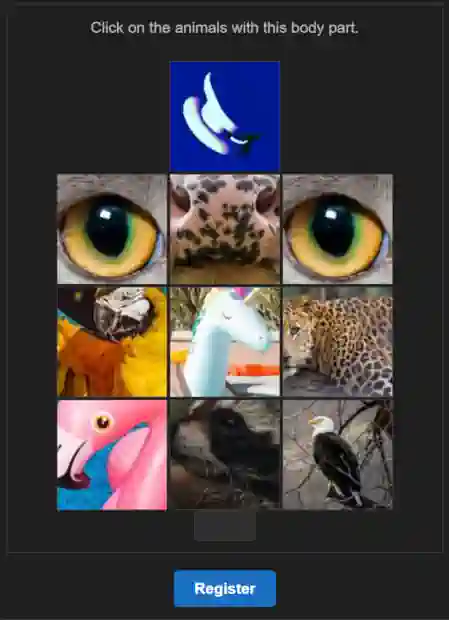
Somehow, this stopped the botting problem entirely. Sure, there could be a bunch of improvements for the plugin.
- It should be data driven. Right now, a set of images is hardcoded into the plugin.
- The images are not uniquely served; they always use the same URLs when requested.
- I’d add some noise to this to prevent basic hashing of captcha images.
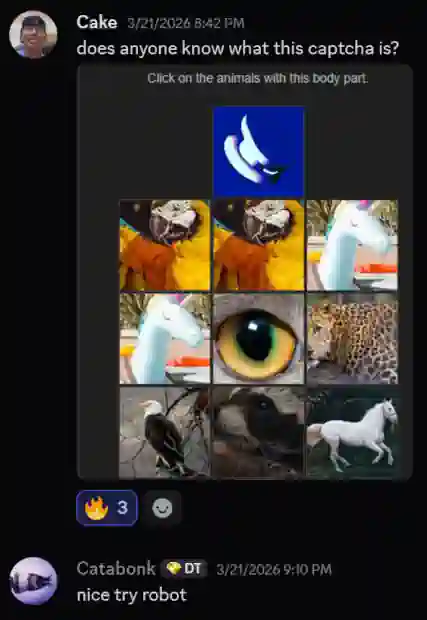
- The current captcha is a bit confusing. Which made for some amusing interactions.
It has been working for months, so I haven’t felt the need to come back to it.